Your AI Account Knows How You Think
By Reza Motaghi

On this page
- Why Your Personal AI Chat Account Isn't Just Another Login
- Why AI Privacy Isn't Like Email or Social Media Privacy
- The Three Ways AI Data Is More Dangerous
- The Misconception
- What Most AI Experts Get Wrong
- The Stakes
- Your Intellectual Property and Business Ideas
- Your Prompt Reliability and Workflow Stability
- Legal and Regulatory Exposure
- Your Psychological Profile
- Why It's Worse for Solo Builders
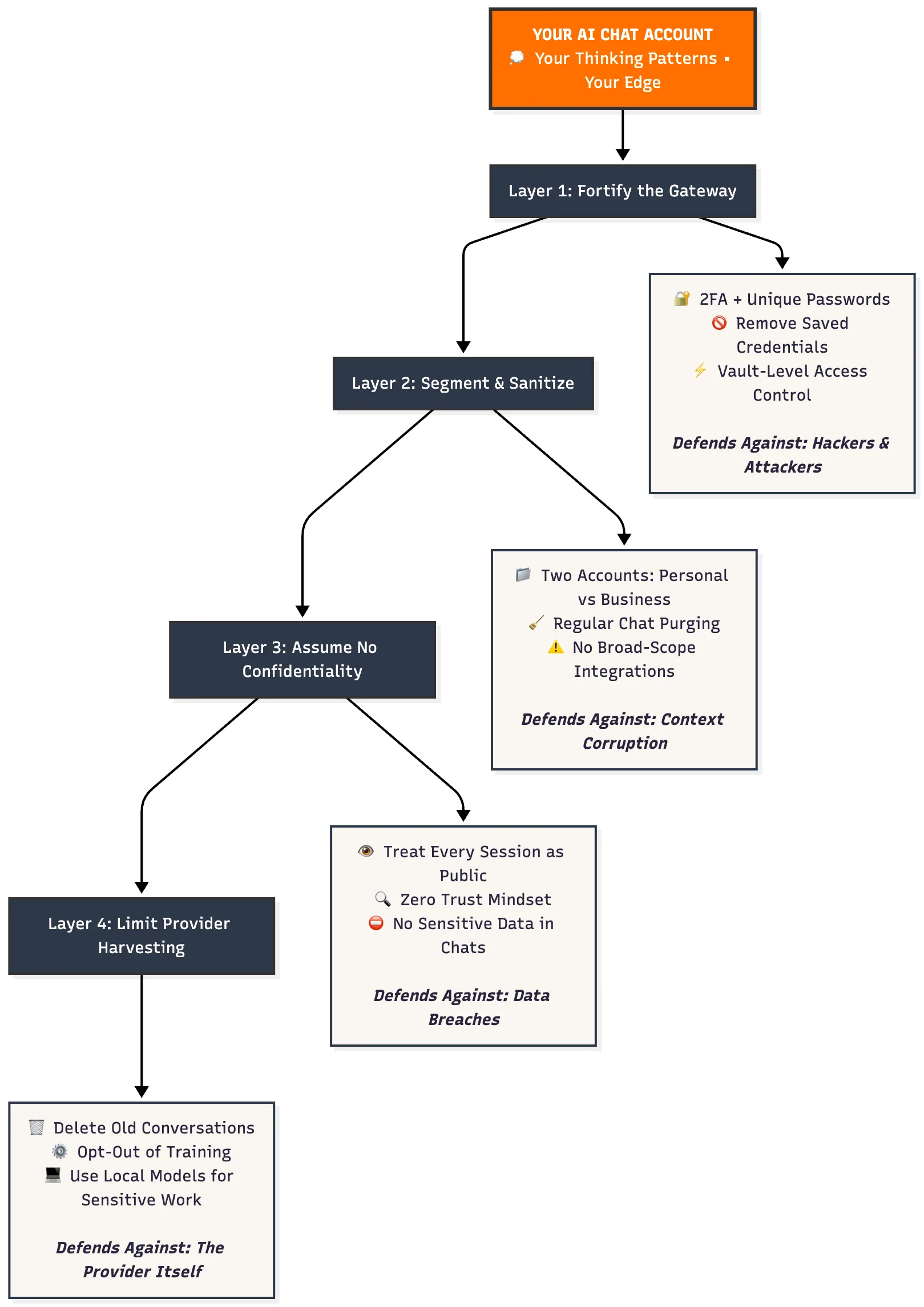
- The 4-Layer Defence Framework
- 1. Fortify the Gateway
- 2. Segment and Sanitize the Workflow
- 3. Assume the Model Is Not Confidential
- 4. Limit What Providers Can Harvest
- What to Do Now & Recap
- Implementation Protocol
- The Contrarian Truth You Must Accept
- Key Takeaways
- Frequently Asked Questions (FAQ)
Why Your Personal AI Chat Account Isn't Just Another Login
You treat your AI chat login like a secondary email account or a sandbox. You shouldn't.
Most solo builders only wake up to the risk after it's too late.
Every prompt you send to a large-language chatbot becomes part of a dossier on how you think, what you fear, and how you strategise.
Why AI Privacy Isn't Like Email or Social Media Privacy
Your email stores what you wrote.
Your social media stores what you shared.
Your AI chat stores how you think.
That's not incremental risk but a categorical risk.
The Three Ways AI Data Is More Dangerous
1. AI Creates Continuous Psychological Profiles
Social media posts feel like snapshots. AI conversations turn into living dossiers. Every prompt reveals:
- How you make decisions under pressure
- What you fear and how you rationalise it
- Your communication patterns when things go sideways
- The exact language that can be used on you
To a hacker or a hostile competitor, that's not just valuable data. That's an instruction manual for manipulating you.
2. AI Data Compounds Over Time
When your email account is breached, past messages leak.
When your AI chat account is breached, your decision-making framework leaks, sometimes including patterns you don't even remember exposing.
The longer you draw from a single account without segmentation, the more dangerous the breach becomes.
3. AI Providers Have Misaligned Incentives
Email services want you to keep using email.
Social platforms want you to keep posting.
But AI chat providers want your mental patterns, so they can train models, build products, and sell them (or compete with you).
That's not a bug. It's the business model.
It's why consumer AI privacy is fundamentally different from every other privacy threat you've managed before.
The Misconception
Most solo builders operate on faulty assumptions:
❌ Friendly interface = low risk
❌ Deleting chats = full removal
❌ Consumer tool = built-in confidentiality
All three assumptions are wrong.
A recent literature review found major gaps in user awareness: only ~24 % of users fully understood how chatbot data is handled. (1)
Another investigation found user chats are routinely used for model training by default, and some providers retain data indefinitely. (2)
Assume your prompts are never truly deleted. Design accordingly.
What Most AI Experts Get Wrong
The AI-advice industry focuses on prompt engineering, model stacks, and convenience.
What almost nobody talks about is access control and data hygiene at the solo-creator level.
Why? Because most so-called "experts" are theorists—they've watched slides, not signed contracts, not handled client IP leaks.
They've never had to explain to a client: "Yes, your strategy just landed in your competitor's LLM dataset."
The Stakes
Your Intellectual Property and Business Ideas
When strategy or client-work goes into the same AI chat account you use for casual prompts, you collapse the boundary between vault and sandbox. Every failed idea, every pivot, every question you experiment with—it's all stored, categorised, and potentially reused or sold.
Your Prompt Reliability and Workflow Stability
Prompt reliability means predictable, strong outputs. But when you mix casual exploration with business strategy in one account, you build a noisy data profile. The more you blur personal testing and serious strategy, the weaker your outputs—and the more exposed your thinking patterns become.
Legal and Regulatory Exposure
Consumer-tier chat models rarely include confidentiality guarantees. They often retain data long-term, train on it, and reuse it in ways you may not expect. (3)
If you work in regulated fields (healthcare, finance), this risk isn't optional. It's a potential compliance violation.
Your Psychological Profile
Each prompt you send reveals how you decide, what you doubt, what you fear. That framework you asked the model to help refine? A hacker or competitor can reverse-engineer it. Your AI chat history isn't just data—it's your identity.
Why It's Worse for Solo Builders
You left the corporate ladder. Your business is you. One email. One login. One failure point. No dedicated IT team. No segmented access.
So when your account leaks, your brand, your workflow, and your competitive edge all leak with it.
Even when you're not in a regulated sector, this still matters: the account you treat as informal is feeding your business strategy into a system that wasn't built to protect it.
Your chat history is not ephemeral. It is neither private by default nor isolated. It is a vector of human-information risk and a systemic data risk.
Unless you shift how you treat that account, you're walking the same path companies spend millions to block.
For the disciplined mindset needed to avoid reactive security decisions, see Selective Engagement: Winning Life's Battles.
The 4-Layer Defence Framework
Here's the diagnostic framework I use when assessing a solo-builder's AI chat workflow. It represents the minimum necessary precautions you MUST take if you're using AI chats for serious work.
1. Fortify the Gateway
Your login is the front door to your archive of thinking.
- Enable two-factor authentication (2FA) on every chat account you use.
- Set a unique, strong password—never reused elsewhere.
Why this matters more for AI than email:
Email breaches leak messages. AI breaches leak thinking patterns.
How enterprises handle this:
- Private AI instances (e.g., Azure OpenAI, AWS Bedrock) where data stays in-house.
- On-premise models running entirely on company servers.
- Hardware security keys mandatory.
- SSO with audit trails — every prompt logged and traceable.
- Network isolation — AI accessible only on approved corporate devices.
What this reveals:
Your AI login is worth more to an attacker than your banking login. Because it reveals how you'd respond to fraud, what language manipulates you, and which vulnerabilities you'd overlook under pressure. That's not data theft. That's psychological access.
Minimum viable defence for solo builders:
2FA + unique password + vault-level access control.
Remove saved credentials from synced/shared devices.
Risk summary: Poor access controls remain a major cause of AI data incidents. (4)
Solo-builder reality: If your chat account is your vault, treat it like a vault. Lock the door.
2. Segment and Sanitize the Workflow
Your prompts = your data feed. How you channel them matters.
Create two accounts: one for personal exploration (casual ideas, tests, learning) and one for your own business work (side projects, solo strategies, personal brand building).
Important boundary: This segmentation works for personal AI use—your own learning, side projects, and solo exploration.
If you handle client data, employee information, or work in regulated sectors (healthcare, finance, legal), consumer AI accounts create legal exposure that security hygiene can't fix.
That's a different problem entirely—covered in the next article about Business AI Privacy.
Why workflow hygiene matters for AI:
When you mix domains in email, you get inbox clutter.
When you mix domains in AI, you corrupt the model's understanding of you.
Every prompt trains the model's context window on your patterns. If you're debugging code in the same account where you're drafting personal reflections, the model blends technical precision with introspective language and gives you mushy outputs in both.
Clean workflow = cleaner prompt reliability.
Solo-builder reality: Mix sandbox and vault in one room, you build a risk factory.
For workflow focus and discipline principles, see the Next Step Framework.
- Avoid linking that business account to broad-scope services unless audited.
- Regularly purge and delete old chats. One study found up to a third of users upload business and personal files into consumer chat accounts without sanitisation. (5)
3. Assume the Model Is Not Confidential
The biggest failure: believing the chat-model was built to protect your secrets. It wasn't.
- Recent research found that multiple major AI-chat providers use user inputs for model training by default and retain data long-term. (2)
- Privacy watchdogs warn that "long-term storage of user data increases the risk of misuse." (6)
If you assume confidentiality, you're already behind. Therefore: treat each session as if someone else could review it or misuse it.
Solo-builder reality: You draft a new positioning framework at 11 pm in ChatGPT, then use the same account to debug code the next morning. You just built one single point of catastrophic failure, and called it productivity.
4. Limit What Providers Can Harvest
The first three layers protect you from third-party attacks. This layer protects you from the company you're paying.
The harsh reality: You can't fully stop providers from harvesting your data in consumer accounts. But you can limit what they get.
Reduce Your Data Footprint
✅ Delete old conversations regularly — not because it erases data but because it limits the continuous psychological profile they build.
✅ Opt-out of training/improvement programs — Settings > Data Controls > Disable training. (But metadata still gets harvested.) (7)
✅ Treat "Incognito" mode skeptically — many providers still store chats for ~30 days for "safety review." (8)
✅ Never store credentials or API keys in chat — even in "private" sessions. Anything you paste may be logged.
✅ Use local models for truly sensitive work — Tools like Ollama (requires ~16 GB RAM) keep everything on your machine; no internet, no provider harvesting.
The Exploitation Loop You Can't Break (But Can Slow)
Every prompt makes their product smarter.
Every subscription funds the system that will eventually compete with you.
Every "helpful" response extracts more value than it provides.
You can't change their business model.
But you can change your exposure to it.
This isn't paranoia. It's pattern recognition from someone who's seen both sides of the AI-privacy contract.
For a deeper dive into preventing fragility in your solo-builder AI system, see Why More AI Tools Make You Less Productive.
What to Do Now & Recap
Implementation Protocol
-
Audit your login settings today: Enable 2FA, change passwords, remove saved credentials from shared/synced devices.
-
Segment your use: Create one account for personal exploration (ideas, tests, drafts) and a second account for your own business work (side projects, strategies, personal brand).
Note: If you handle client data or regulated information, consumer accounts—even segmented—aren't enough. That requires business-grade AI with legal protections (covered in the next article).
-
Purge or delete historical chat data: Identify past conversations with business thinking or personal vulnerability. Delete or relocate them.
-
Assume no confidentiality by default: Before each session ask: "If this chat were exposed tomorrow, would I be okay with the text and context being public?" If no—move the prompt to a secure account.
-
Document your prompt policy: Example: no personal banking in consumer account; no client-identifiable details in consumer account; business strategy stays in business-grade environment.
The Contrarian Truth You Must Accept
Begin with these layers: lock your login, segment workflows, assume the model isn't your confidant, and limit what providers can harvest.
The biggest vulnerability in your solo-builder workflow isn't a missing feature—it's how you treated your prompts, your account, and your expectations of confidentiality.
The goal isn't paranoia. It is prompt reliability, implementation integrity, and protecting your thinking patterns—because that's your edge as a one-person startup.
Every prompt you send either sharpens that edge or dulls it. Choose accordingly.
Key Takeaways
-
Your personal AI chat account is a high-value target for both hackers and providers.
-
A 4-Layer Defence (access control, workflow segmentation, zero-trust mindset, provider exposure limits) is essential for solo builders.
-
AI privacy is categorically different from email or social media—it exposes how you think, not just what you said.
-
Providers train on your data by default, and deleting chats does not guarantee removal. (9)
Frequently Asked Questions (FAQ)
1. What are the main security risks of using a personal AI chat account?
The biggest risk is that your account becomes a detailed dossier on your thinking patterns, business strategies, and personal fears. Because many providers train on user data by default, you risk exposing your intellectual property, client data, and psychological profile to data leaks, reuse in training, or provider misuse. (2)
2. Does deleting my AI chat history actually remove my data?
No. While conversations may be hidden from your view or slated for system deletion within 30 days, legal or regulatory retention rules often override this. Assume the provider retains the metadata and the core text indefinitely. (10)
3. Why are solo builders more vulnerable to these AI security risks?
Solo builders have fewer layers of defence than a corporation. Your personal AI account often serves multiple purposes (personal ideas, business strategy, client work), so one account becomes a single failure point. If that account is compromised, your brand, IP, and competitive edge leak with it.
4. What are the first steps I should take to secure my AI chat account?
Start with the Implementation Protocol from the 4-Layer Defence Framework:
- Fortify your login with 2FA and strong unique passwords.
- Segment accounts: one for casual/exploratory use, one for business-strategic prompts.
- Assume no confidentiality: ask if any chat could be exposed before you use it.
- Limit provider harvesting: delete old chats, opt-out of training programs, consider local models for the most sensitive work.
5. Should I use separate AI accounts for personal and business use?
Yes—absolutely. This is the core of the "Segment and Sanitize" layer. Using one account for both sandbox (personal exploration) and vault (business strategy) collapses your security boundary. Use a business-grade environment for client work and a separate account for casual use.